{{ post.title }}
글 편집
글 편집 (이전 에디터)
{{ post.author.name }}
Posted on
| Version | {{ post.target_version }} | Product |
{{ product.name }}
|
|---|---|---|---|
| Tutorial/Manual | {{ post.manual_title }} | Attached File | {{ post.file.upload_filename }} |
For example, you may have defined four contacts and want to set stiffness of each contact to 10,000.
But, editing each contact separately is very cumbersome.
If you have 10 or more contacts, it would be more cumbersome.
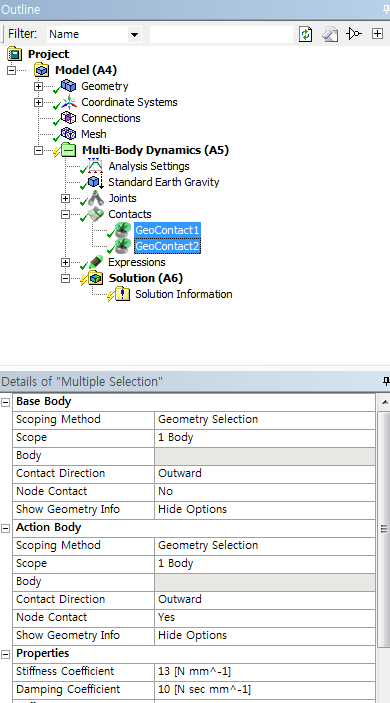
In this case, select the entities whose values you want to change on the Outline (Tree Control).
If the entities you selected are the same type of elements, their details are displayed. Then, on the Details window, change a value to apply the value to all entities.
If their parameter values are different, the parameters are displayed as blank when you select the multiple entities.
If the parameter values are the same, the Details window displays the values. (This is the same as RecurDyn.)